
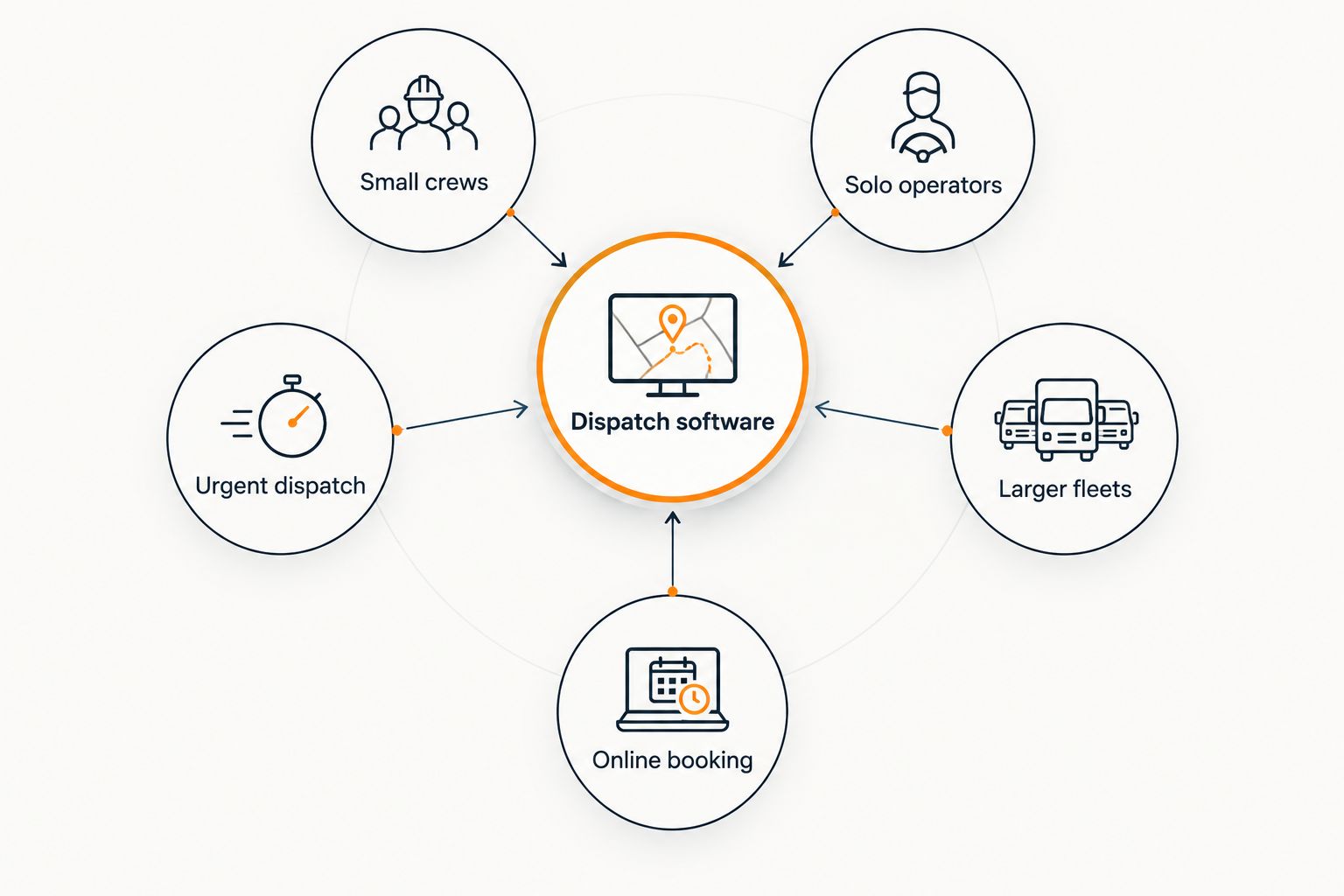
The best dispatch software for mobile locksmiths in 2026 is Jobber for a small crew. Choose Kickserv if you work alone, Dispatch.me if urgent call assignment drives your day, ServiceTitan if you manage a larger fleet, or Housecall Pro if online booking is central to your workflow.
- Jobber is the best dispatch software for mobile locksmiths who need scheduling and invoicing alongside job assignment.
- Kickserv fits solo locksmiths; Dispatch.me fits businesses focused on urgent call assignment.
- ServiceTitan suits larger fleets, while Housecall Pro suits locksmiths taking scheduled bookings online.
- Click Smith Pro helps locksmiths generate calls; dispatch software manages the jobs that follow.
Why this matters
A locksmith call does not become a completed job when someone answers the phone. You still need to record the address, assign the work, tell the customer what happens next, and close out the job. The best dispatch software keeps those steps connected without forcing your technician to reconstruct the details from a text message.
That distinction matters in 2026 because dispatch and lead generation solve different problems. Click Smith Pro provides SEO, PPC, local SEO, Google Business Profile, and website design services for U.S. locksmith businesses seeking more calls and leads. Dispatch software takes over after a call becomes a job. If you cannot tell which calls turn into booked work, compare your dispatch records with the sources described in this call tracking software guide for locksmiths.
Do not pick a platform because its feature list is longest. Decide whether your constraint is assigning urgent calls, keeping a small crew organized, or coordinating a larger operation. Each requires a different level of dispatch control.
What makes the best dispatch software for mobile locksmiths
Use these six buying criteria to evaluate a 2026 dispatch platform. Ask each vendor to show the workflow using a locksmith call, not a generic appointment.
- Call intake: Can you enter the address, contact details, job type, and urgency while speaking with the caller? A usable record prevents the technician from having to ask for the same information again.
- Assignment: Can the dispatcher see who is available and change an assignment when a more urgent call comes in? Check the actual steps, not just whether the product advertises dispatching.
- Technician view: Does the mobile app show the job details a technician needs before arriving? Test what happens when the address or instructions change after assignment.
- Customer updates: Can your team give a useful arrival update without calling the technician for a status check? Ask what is automated and what still needs a dispatcher.
- Job closeout: Can the technician record work completed and move the job toward an invoice without re-entering the details elsewhere?
- Team fit: Does the interface still make sense for your operation? A business with 1 truck and one with 5 trucks do not need the same dispatch board.
The options at a glance
| Software | Best for | Standout focus | Key limitation to check |
|---|---|---|---|
| Jobber | Small crews | Scheduling and invoicing alongside job management | Confirm how urgent calls affect the existing schedule |
| Kickserv | Solo operators | Straightforward service-job management | Check assignment controls before adding technicians |
| Dispatch.me | Urgent dispatch | Technician coordination and customer updates | Check whether its closeout workflow meets your needs |
| ServiceTitan | Larger fleets | Detailed dispatch and operational reporting | Assess setup demands before committing |
| Housecall Pro | Online booking | Scheduling and customer-facing booking | Check how it handles unscheduled lockout calls |
A feature appearing in a product description is not proof that it fits a locksmith workflow. Before choosing, walk through an incoming lockout call, a changed address, and an unfinished job. The table tells you which product to examine first; the demonstration tells you whether it belongs in your business.
1. Jobber: best dispatch software for small locksmith crews
Jobber is the default pick when you need job scheduling, technician assignments, and invoicing in the same service-business system. That combination matters when calls arrive throughout the day and you cannot afford to lose the job details between the person answering and the person driving. Its broad field-service focus also means you must test locksmith-specific situations rather than assume the workflow fits them.
Start a demonstration with an emergency lockout inserted between scheduled rekeys. Then move the job to a different technician and check whether the information travels with it. If your dispatcher can do both without maintaining a separate message thread, Jobber deserves the top spot on your shortlist.
Jobber pros:
- Brings scheduling, job management, and invoicing into one workflow.
- Gives a small crew a shared record of appointments and completed work.
- Fits a business that handles both booked service and incoming calls.
Jobber cons:
- It is a general field-service platform, not a locksmith-specific system.
- You must verify that urgent reassignment works the way your team expects.
Best for: a small locksmith crew seeking one place to schedule work and close out jobs. Verdict: Buy if its emergency-call demonstration matches your dispatch process.
2. Kickserv: best dispatch software for solo operators
Kickserv is the leaner starting point for a locksmith who answers the phone and completes the job. In that setup, the immediate need is an organized job record, a workable schedule, and a clear path from completed work to an invoice. A complex fleet view adds little when the dispatcher and technician are the same person.
Test Kickserv by entering a call while another job is in progress. Can you find the address, customer details, and next appointment quickly from your phone? That test matters more than a long list of features you will not use. If you plan to add technicians, test assignment and handoff before choosing it as a long-term system.
Kickserv pros:
- Keeps the evaluation focused on core service-job management.
- Makes sense for an owner who handles both calls and field work.
- Covers scheduling and job records without making fleet reporting the reason to buy.
Kickserv cons:
- A simple solo workflow does not establish that it will fit a growing dispatch team.
- You should check how assignments and customer updates work before hiring another technician.
Best for: a solo mobile locksmith who needs to track jobs without building a dispatcher-led process. Verdict: Buy for a solo workflow; reassess when the team grows.
3. Dispatch.me: best for urgent call coordination
Dispatch.me belongs on the shortlist when the hardest part of your day is deciding who takes the next urgent job and keeping the customer informed. A scheduled rekey can sit on a calendar. A lockout caller needs a clear assignment and an arrival update. Evaluate the product on those moments rather than on routine appointment entry alone.
Ask the vendor to show a technician becoming unavailable after a job has been assigned. Watch how the dispatcher changes the assignment and what the customer sees. Then follow the job through completion. Dispatch strength is useful, but it cannot replace a closeout process your team will actually use.
Dispatch.me pros:
- Puts technician coordination at the center of the buying decision.
- Gives emergency-focused businesses a focused workflow to test.
- Encourages evaluation of customer updates alongside assignments.
Dispatch.me cons:
- Its fit depends on whether its job completion workflow covers your needs.
- You must check how it works with any separate invoicing system you retain.
Best for: a locksmith business where urgent calls repeatedly change the dispatch plan. Verdict: Buy if reassignment and closeout both pass your live demonstration.
4. ServiceTitan: best dispatch software for larger fleets
ServiceTitan is the larger-operation choice. Its dispatching and reporting scope is relevant when someone manages technicians across a busy schedule and needs a clear view of work in progress. That does not make it the default for every locksmith. More controls also mean more decisions about how jobs, staff, and reporting are set up.
Bring your dispatcher into the evaluation. Ask them to create an urgent job, change its assigned technician, and find its status after the schedule moves. Then ask whoever reviews business performance to locate the job information they need. If both people can use the system without parallel spreadsheets, the added depth serves a purpose.
ServiceTitan pros:
- Offers a dispatch-focused view suited to coordinating a larger team.
- Gives managers more operational detail to evaluate.
- Provides room for a business with a dedicated dispatch role to formalize its process.
ServiceTitan cons:
- More setup and configuration make it a poor fit for a team that needs only a basic job list.
- A solo owner has little reason to adopt a larger-operation workflow.
Best for: a locksmith operation with multiple technicians and a person responsible for dispatch. Verdict: Buy only when your team will use the additional controls.
5. Housecall Pro: best for online booking
Housecall Pro is the strongest fit in this list when customers regularly schedule non-urgent work through your website. Online booking can help organize rekeys and other planned appointments before they reach the calendar. Emergency calls are different: someone locked out needs a person or process that responds immediately, not a convenient slot later in the week.
Test those paths separately. Book a planned job as a customer would, then ask the vendor to demonstrate an incoming urgent call that interrupts the schedule. Check how the technician receives the update and how the completed job moves into the rest of your workflow. A smooth booking form alone does not prove smooth dispatch.
Housecall Pro pros:
- Connects online booking with service scheduling.
- Fits a business that wants customers to request planned work through its website.
- Keeps the customer-facing appointment process central to the evaluation.
Housecall Pro cons:
- Online booking does not solve urgent-call assignment by itself.
- You must test interruptions and reassignments against your actual call mix.
Best for: a locksmith business with a meaningful share of scheduled, website-driven jobs. Verdict: Buy if urgent calls remain easy to handle alongside online bookings.
How these options were ranked
The ranking follows the six criteria above, with extra weight on call intake, assignment, and technician handoff. Jobber takes the overall spot because scheduling, job management, and invoicing address the broadest small-crew workflow. Kickserv, Dispatch.me, ServiceTitan, and Housecall Pro each take a narrower slot rather than pretending that a solo owner, an urgent-call dispatcher, and a larger fleet need identical software.
This is a fit-based recommendation, not a claim that every platform has passed a locksmith-specific field test. Confirm current features directly with each vendor. For a useful 2026 comparison, give every demonstration the same call scenario and record where your team has to leave the system or enter details again.
Which dispatch software should you choose?
Choose Jobber if you run a small crew and want dispatch, scheduling, and invoicing connected. Choose Kickserv if you work alone and need a manageable job workflow. Put Dispatch.me first when urgent assignment is the recurring problem, ServiceTitan first when a dispatcher coordinates a larger team, and Housecall Pro first when online booking supplies much of your planned work.
If you are still undecided, demonstrate Jobber first. Use the same incoming-call scenario with the other products only when Jobber fails a requirement you have identified. Do not replace an existing system just because another dashboard looks cleaner. Write down the handoff or reporting problem you need to fix, then require the replacement to solve it in front of your team.
Click Smith Pro is a locksmith marketing agency, not a dispatch software vendor. Its SEO, PPC, local SEO, Google Business Profile, and website design services address how U.S. locksmith businesses get calls and leads. The dispatch decision addresses what happens after those calls arrive.
FAQ
What is the best dispatch software for mobile locksmiths in 2026?
Jobber is the best overall choice for a small locksmith crew that wants scheduling, job management, and invoicing together. Test its urgent-call assignment workflow before deciding.
Which dispatch software suits a solo mobile locksmith?
Kickserv is the solo-operator pick because the main need is an organized schedule and job record rather than a fleet dispatch board. Check its handoff controls if you expect to add technicians.
Is Jobber or ServiceTitan better for a locksmith business?
Jobber is the better starting point for a small crew; ServiceTitan fits an operation that needs more dispatch oversight and reporting. Choose based on who assigns jobs and how much operational detail that person needs.
Which option is best for emergency locksmith calls?
Dispatch.me is the option to evaluate first when urgent call assignment and customer updates are your priority. Demonstrate an unavailable technician and a reassigned lockout before choosing it.
Can Housecall Pro handle scheduled locksmith appointments?
Housecall Pro is a strong candidate when customers book planned work online. Test urgent phone calls separately so scheduled appointments do not hide a dispatch gap.
Does dispatch software replace call tracking?
No. Dispatch software organizes the job after a call arrives; call tracking helps identify where the call came from. Compare both records to see which incoming calls become completed jobs.
Does Click Smith Pro provide dispatch software?
No. Click Smith Pro is a digital marketing agency for U.S. locksmith businesses. Its stated services include SEO, PPC, local SEO, Google Business Profile, and website design, not dispatch software.
One last thing
Before you switch tools in 2026, follow 1 real call from first contact to completed job. Note every time someone repeats an address, checks a technician's availability elsewhere, or re-enters work details. That exercise gives you a buying requirement no feature list can supply. Click Smith Pro can help address the separate question of getting more locksmith calls; your dispatch platform must make the calls you receive easier to manage.
Related guides